Your days.
Together.
One app for the two of you: the conversations that keep you close, and the logistics that fill the day — lists, calendar, chores and money.
Everything unlocked for three days. Then US$ 9.90 a month or US$ 79 a year. One of you pays, both get in.
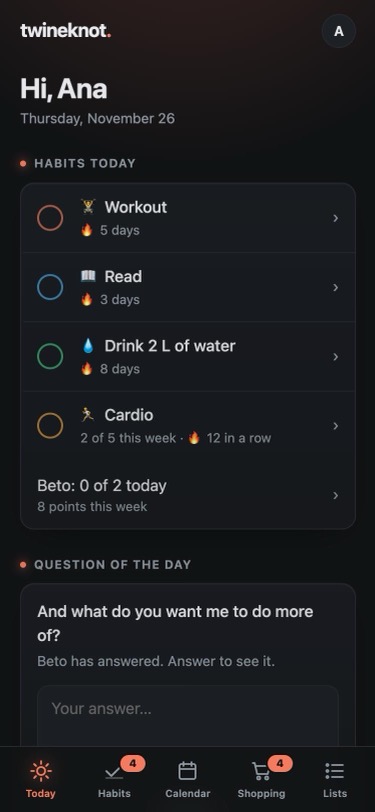
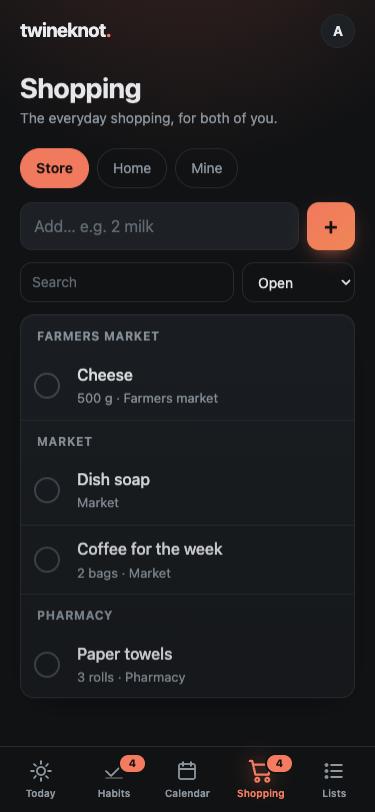
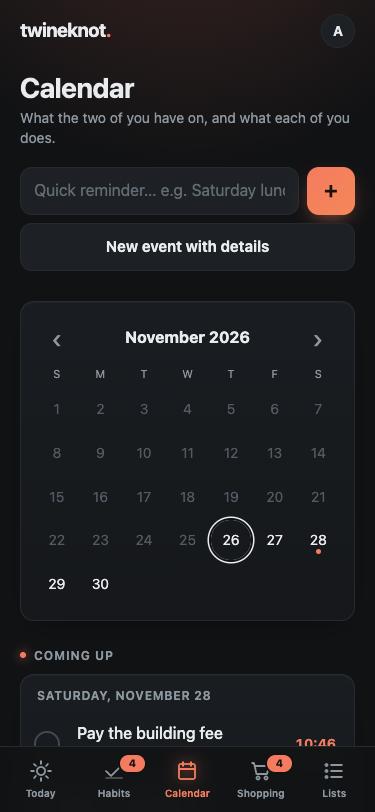
Two halves that usually live in two apps
Every couples app sells the feeling. This one also carries the week: what to buy, who does which chore, what each of you owes, what is on Saturday.
- A question a day, a letter a week. Neither of you reads the other before writing your own.
- Habits side by side. With a day off that does not break the streak.
- Chores by weight. Who carried the week, as a share — never a ranking.
- Lists, calendar and money. Grouped by shop, split to the cent, with invites you can counter.
- After a fight. Three questions, and a wait before either of you can write.
- A year, counted. Days together, longest streak, the thing you bought most.
What you write stays between you
Not “private” as a feeling — here is the mechanism. Before you answer the day’s question, your partner’s answer is not sent to your phone at all: the lock is in the server, not in the screen. The same holds for the week’s letter and for what each of you writes after a fight. Cycle data is not shared unless you turn sharing on, and turning it off stops it being sent the same second.
- No followers. There is nobody else here. It is an app for two.
- No feed, no algorithm. Nothing decides what you should see.
- No ads. You pay for it, so nobody else is the customer.
Your days.
Together.
A place just for the two of you, and a corner for each.
New password.
With your e-mail and the recovery code you saved when you signed up.
Create an account.
You create your TwineKnot and invite the person who will share it with you.
You have been invited.
Create your account to join the TwineKnot of whoever invited you.
The other person is missing.
TwineKnot is for two. Send this link to the person who will share it with you.
Valid for 14 days, single use. Creating another one cancels this.